
How to Make a Photo of Yourself Rap (No Audio, No Filming)
Turn a selfie into a rap video without recording audio or filming. Pick the right photo, write bars about yourself and see what 3 free credits can make.
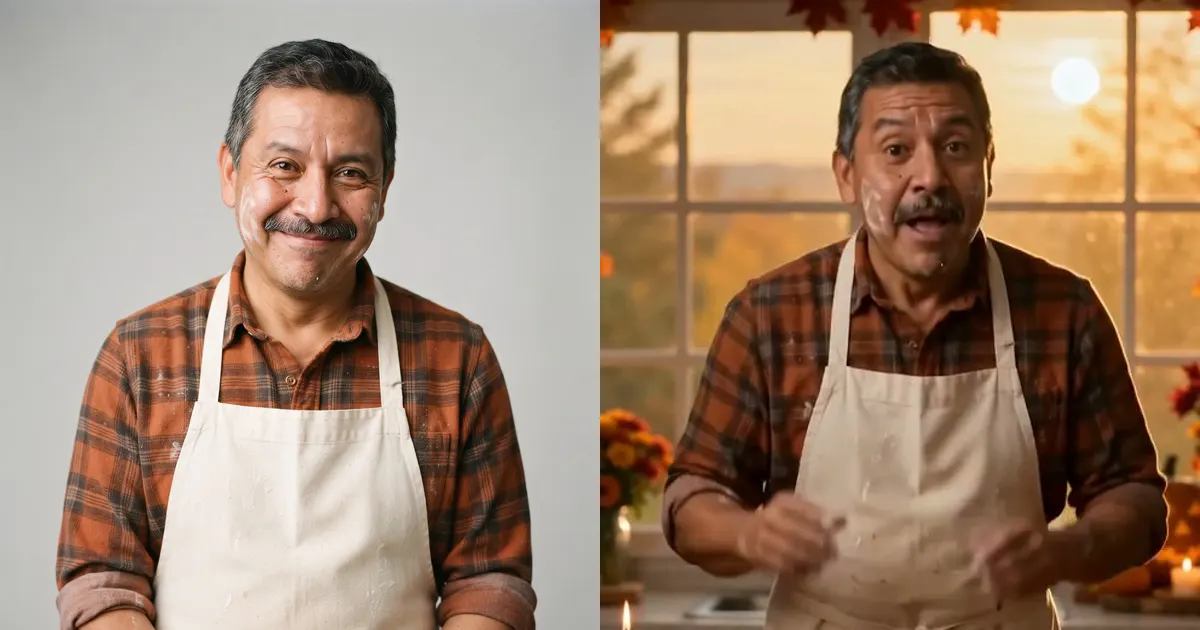
The short answer: upload one clear selfie to a photo-to-rap tool, type a topic and press Create. The AI writes the lyrics, makes the beat and vocals, and animates your face, so you don't need to record audio, film yourself or edit anything.
This guide uses RapVideo AI, which we make, and focuses on what matters when the rapper is you. For every screen in the generator, see the full step-by-step guide.
First, check that this is the right route
There are two ways to make a photo rap, and the difference is who supplies the audio.
| You have | What to use | What you get |
|---|---|---|
| A photo, and maybe some lyrics | A photo-to-rap tool | AI lyrics, beat, vocals and video |
| A photo and your own recording | A lip-sync tool | Your audio with an animated face |
| A finished song | A song-to-video tool | Visuals built around your track |
This guide covers the first row. For the others, our comparison of AI rap video generators shows which tools fit, where we could confirm it.
Step 1: Pick the right selfie
The photo decides most of the result. Choose one where:
- Only you are in the frame. Crop out friends and busy backgrounds.
- You're facing the camera with both eyes visible.
- Your mouth is clear. Avoid hands, microphones, masks or hair across it.
- Your shoulders are visible. A tight face crop leaves no room for hand gestures.
- The light is even. Daylight from a window usually works better than harsh flash.
- There's no heavy filter. Beauty filters and sunglasses make the face harder to animate.
The upload takes JPG, PNG or WebP. Your outfit carries into the video, so wear what you want to be seen rapping in.
Step 2: Choose where you want to perform
Open the generator, keep Solo selected and add your photo. Then pick a scene and a beat:
- Hotel Lobby: the bright orange booth from the viral trend.
- Studio Booth: neon lights and a recording-session look.
- Street Cypher: a city corner at night with a small crowd.
- Luxury Lobby: marble and chandeliers, good for a flex.
For beats, Trap is a safe default and Old School suits anything playful.
Step 3: Write bars about yourself
This is where a selfie video gets funny. Specific details work better than general bragging. Try a topic like one of these:
- I've been "five minutes away" for the last forty minutes
- I own 12 plants and I've killed 30
- My whole personality is my air fryer now
- I said I'd go to the gym in January, and it's November
Type a topic and press Write lyrics to get a draft you can edit, or leave the lyrics empty and let the AI write them. Your own bars work too, one per line. Plan on about one line for every 2.5 seconds, so a 10-second video fits four lines.
Step 4: Start with a cheap test
Your free credits cover one short clip, which shows whether your photo works before you pay for a longer video.
| Settings | Credits | Clips from 3 free credits |
|---|---|---|
| Standard, 480p, 5 seconds | 3 | 1 |
| Standard, 480p, 10 seconds | 5 | Needs more credits |
| Standard, 720p, 10 seconds | 9 | Needs more credits |
| Fast, 720p, 10 seconds | 14 | Needs more credits |
The exact cost shows on the Create button. Our own 5-second Standard 480p test finished in under two minutes, though most videos take 2 to 4 minutes. Lower settings can show less detail, so use the test to check the photo, then make your final version at higher quality.
Step 5: Check it, then share it
Watch the finished clip with the sound on. If the face or lyrics look off, see the fixes below. Failed renders are refunded, but a video that finished and didn't turn out how you wanted still uses credits.
Then download the MP4 and post it. 9:16 suits TikTok, Reels and Shorts. Please label it as AI-generated when you share it.
A real example
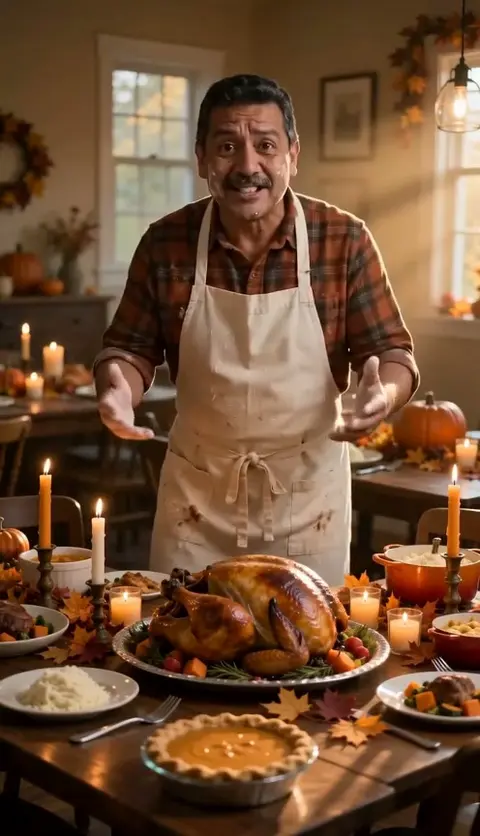
This clip started from a single waist-up studio portrait of a fictional, AI-generated man, and it uses the scene from our Thanksgiving rap video page. His flannel shirt, apron and mustache all came from the photo. The lyrics:
Told the whole family that the bird would be prime Smoke alarm singing right on time Burnt on the outside, cold in the middle Pizza's on the way, we'll be fine in a little
Common problems and quick fixes
- It doesn't look like you. Use a sharper, more front-facing photo with nothing else in the frame.
- The mouth looks blurry. Make sure it's fully visible in the photo, or try a higher resolution or model.
- The words feel rushed. Use fewer, shorter lines, or choose a longer video.
- The voice isn't what you pictured. The AI generates the voice, so the result can vary. Generating again can give a different take, but it costs credits again.
What this can't do
- It won't use your real voice. It generates an AI rap voice, and there's no voice cloning.
- It makes clips, not songs. Videos run from 5 to 15 seconds in a single scene.
- It can't use your recording. There's no audio upload.
Your photo and other people's
Use your own photo, or one you have permission to use. Don't upload photos of celebrities or anyone who hasn't agreed, and don't use a video to impersonate or mislead anyone. Our Acceptable Use Policy has the full rules, and our Privacy Policy explains how uploads are handled.
FAQ
Can AI make a photo of me rap without any audio?
Yes. A photo-to-rap tool such as RapVideo AI takes one clear photo and generates the lyrics, beat and vocals itself, then animates your face. You do not record or upload any audio.
Will the rap sound like my real voice?
No. RapVideo AI generates a new AI rap voice and doesn't clone yours. There is no voice upload, and you can't choose a specific voice.
Is it free?
You can start for free. New accounts get 3 credits, valid for 30 days, with no credit card, and the videos have no watermark. That covers one 5-second 480p video on the Standard model.
What kind of selfie works best?
Use a sharp, well-lit photo with only you in it, facing the camera, with your mouth fully visible. Showing your shoulders or upper body leaves room for hand gestures.
Can I use my own recording?
Not with RapVideo AI, which always generates the audio. If you've already recorded a verse, you need a lip-sync or song-to-video tool.
Will my video be public?
No. It stays in your account unless you download it and post it, or choose Share to create a public page. You can turn that page off at any time.
Make your first one
Pick your clearest selfie, think of one thing your friends always tease you about and open the generator. New accounts get 3 free credits, enough for one 5-second video.