
Lyrics to Rap Video: Turn Your Bars Into an AI Video
Paste your own lyrics and get a rap video with AI vocals, a beat and a lip-synced performer. How many lines fit each length, and how to rewrite them to fit.
The short answer: type your lyrics into an AI rap video generator, add a photo and choose a beat. The AI generates the music and vocals and lip-syncs the performer to your words, with nothing to record. For a 10-second clip, keep it to about four short lines.
This guide uses RapVideo AI, which we make, and focuses on getting your own words to fit. If you don't have lyrics yet, start with the free lyrics generator or our complete guide to making an AI rap video.
Check that you need this kind of tool
"Lyrics to video" can mean three different things. The right tool depends on what you already have.
| You have | You want | What to use |
|---|---|---|
| Written lyrics, no audio | Someone rapping your words on camera | A photo-to-rap tool |
| A finished song | Words moving on screen, in sync | A lyric video maker |
| A finished song | Visuals built around the track | A song-to-video generator |
This guide covers the first row. RapVideo AI can't take your audio, so if you already have a finished track, choose one of the other two. Our comparison of AI rap video generators covers tools for those routes where we could confirm it.
Step 1: Make your lyrics fit the clip
This is the step most people skip. A performer can only rap so many words clearly in a few seconds, and videos run from 5 to 15 seconds in one scene. So you're writing a sharp verse, not a whole song.
| Video length | Lines to aim for | Rough character limit |
|---|---|---|
| 5 seconds | 2 | 125 |
| 8 seconds | 3 | 200 |
| 10 seconds | 4 | 250 |
| 12 seconds | 5 | 300 |
| 15 seconds | 6 | 375 |
These figures are guides that come from how our generator estimates pacing: about one line every 2.5 seconds and about 25 Latin characters per second. If your text runs over, the generator warns you before you create anything. The field holds up to 400 characters.
Step 2: Rewrite the lines for rap
Words that read well on a page can be hard to rap. Here's a draft that says too much for 10 seconds:
I woke up this morning and checked my bank account and realized my rent is due again this Friday So I had to sell my couch to a guy on the internet and now I'm sitting on the floor of my apartment
Here's the same idea, cut to fit:
Rent's due Friday, I've got six bucks flat Sold my couch, now I'm sitting on the mat Landlord calling, I'm playing it cool Told him I'm broke and I'm back in school
What changed:
- One thought per line. Each line is short enough to say in one breath.
- Rhymes at the end of the line. The ear can follow them even at speed.
- One specific detail. "Six bucks" is funnier than "not much money."
- One line per bar. Press Enter after each line, because the line breaks mark the bars.
Read the lines out loud with a timer. If you have to rush, the performer probably will too.
Step 3: Set up the video
Open the generator and work through it in this order:
- Choose Solo or Duo. Solo uses one photo. Duo uses one photo for each performer.
- Add a clear photo. Use a sharp, front-facing shot with the mouth fully visible. Our photo guide has more detail.
- Pick a scene and a beat. Trap is a safe default, and Old School suits playful lyrics.
- Paste your lyrics. Put them in the lyrics box, one line per bar.
- Match the length to your lines. Use the table above.
In most Duo scenes, the two performers trade lines. The Hotel Lobby duo works differently: one performer raps at the mic while the other keeps moving, so write those lyrics for one voice.
Step 4: Test it cheaply
Try a short version before you spend credits on the full clip. Take your two best lines and make a 5-second test.
| Settings | Credits |
|---|---|
| Standard, 480p, 5 seconds | 1 |
| Standard, 720p, 10 seconds | 4 |
| Fast, 720p, 10 seconds | 10 |
The exact cost shows on the Create button. New accounts get 3 free credits, which covers one 5-second video on Standard at 480p. Failed renders are refunded, but a finished video that you don't like still uses credits.
Step 5: Listen before you post
Play the result with the sound on and read along. The AI is told to perform your exact lyrics, but it can still rush, slur or change a word. Results also vary between runs, even with the same settings. If something is off:
- Words are rushed. Remove a line, shorten the long ones or choose a longer video.
- A word comes out wrong. Unusual names and made-up words are the usual cause. Swap in a simpler word or spell it the way it sounds.
- The lip sync looks off. Try a sharper photo with the mouth fully visible, or a higher resolution or model.
- The delivery isn't what you pictured. You can't choose a specific voice, but generating again can give a different take. It costs credits again.
A real example

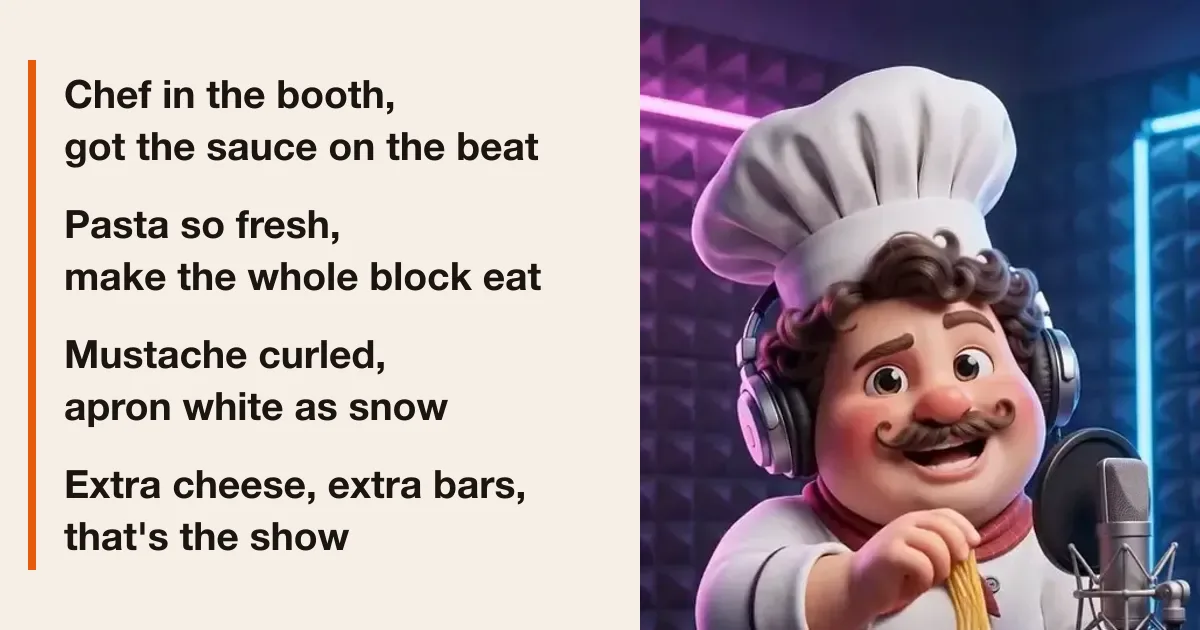
This clip uses a single image of a fictional cartoon chef, the Studio Booth scene and an Old School beat. Four short lines fit its 10 seconds:
Chef in the booth, got the sauce on the beat Pasta so fresh, make the whole block eat Mustache curled, apron white as snow Extra cheese, extra bars, that's the show
What this can't do
- It can't make a full song. The longest clip is 15 seconds, and each video is one scene.
- It can't use your audio. There's no upload for vocals or beats.
- It can't use your voice. The AI generates the rap voice, and there's no voice cloning.
- It doesn't add on-screen lyrics. To show the words, add captions in your editing app or when you post.
Lyrics and photos you can use
Use lyrics you wrote or have the rights to use, and don't copy protected songs. Every topic and line of lyrics goes through a safety check before generation. Use photos of yourself or of people who agreed, and don't upload celebrities. Our Acceptable Use Policy has the full rules.
FAQ
Can AI turn my lyrics into a rap video?
Yes. A tool such as RapVideo AI takes your typed lyrics and a photo, then generates the beat and the rap vocals and animates the performer. You do not record or upload any audio.
How many lines of lyrics fit in a video?
Plan on one line for every 2.5 seconds: 2 lines for 5 seconds, 4 lines for 10 seconds and 6 lines for 15 seconds. The lyrics field holds up to 400 characters.
Will the AI rap my lyrics word for word?
It tries to, but it is not guaranteed. Long lines and unusual words are the most likely to come out rushed or changed, so listen to the result before you post it.
Can I use the lyrics of a famous song?
No. Use lyrics you wrote or have the rights to use. Our Acceptable Use Policy doesn't allow copying protected songs or lyrics.
Can I upload my own vocals or beat?
Not with RapVideo AI. It always generates the audio. If you already have a finished track, you need a lip-sync or song-to-video tool.
Is this the same as a lyric video?
No. A lyric video shows the words on screen over an existing song. This makes a new performance in which a person, pet or character raps your words. It does not add on-screen lyrics.
Try your bars
Pick your best four lines and open the generator. If you'd like inspiration first, browse our funny rap lyrics or try the lyrics generator. Once it's ready, see how to post it on TikTok, Reels and Shorts.